Secure and scale your business data with vorza360’s expert Azure SQL database services. We provide high-performance, fully managed cloud databases with automated protection to keep your information safe.
The Challenge: Markus’s company had an Azure environment that grew too fast, leaving their data exposed. Their “Secure Score” was dangerously low, and their databases had open ports that anyone on the internet could see. A security test proved that their customer data was at high risk of being stolen.
The vorza360 Solution: We performed a “Digital Lockdown” on their Azure SQL Database setup. We closed all public internet access and replaced it with secure “Private Links.” We moved their database passwords out of risky text files and into Azure Key Vault, while setting up Microsoft Defender for SQL to act as a 24/7 guard against hackers.
The Result: Their security score doubled in just three weeks. Markus no longer has “public” data sitting on the web; instead, he has a high-performance, private database that meets the strictest German security standards. His team now has a solid baseline they can maintain easily.
Hanan Al-Sayed (Kuwait)
The Challenge: Hanan’s company won a government contract, but they needed to prove their data was being handled with “military-grade” care. They had no way to show that their databases were being backed up or encrypted correctly to meet the contract’s strict rules.
The vorza360 Solution: We implemented Automated Backups and Geo-Replication for her Azure SQL databases. This ensures that a copy of the data is always safe in a different location. We also used Azure Policy to create a “Compliance Dashboard” that proves her data is encrypted and protected 24/7, providing the government with all the evidence they need.
The Result: Hanan passed her audit with flying colors. She doesn’t have to manually “gather evidence” anymore because the system reports its own health. Her business-critical data is now both compliant and resilient, fulfilling every requirement of her new contract.
Radu Georgescu (Romania)
The Challenge: Radu’s company had too many “hidden” digital keys (Service Principals) with high-level access to their databases. Some were old and unused, but they still had the power to delete entire tables. It was a security “ticking time bomb” that his team didn’t know how to defuse.
The vorza360 Solution: We performed a full “Identity Cleanup.” We deleted the dormant keys and moved his active apps to Managed Identities. This is a “keyless” way to connect to Azure SQL database, meaning there are no passwords for hackers to steal. We also applied the “Principle of Least Privilege,” ensuring each app can only do exactly what it needs to do.
The Result: The risk of a data breach was slashed. Radu’s Azure environment is now lean and organized, with no “ghost” identities left behind. His team now has a lifecycle process to ensure they never accumulate “identity debt” again.
Pavan Kumar (India)
The Challenge: Pavan’s team was storing database connection strings and API keys in their code files. After seeing a partner company get hacked through a leaked code repository, Pavan realized his sensitive data was one mistake away from being exposed to the world.
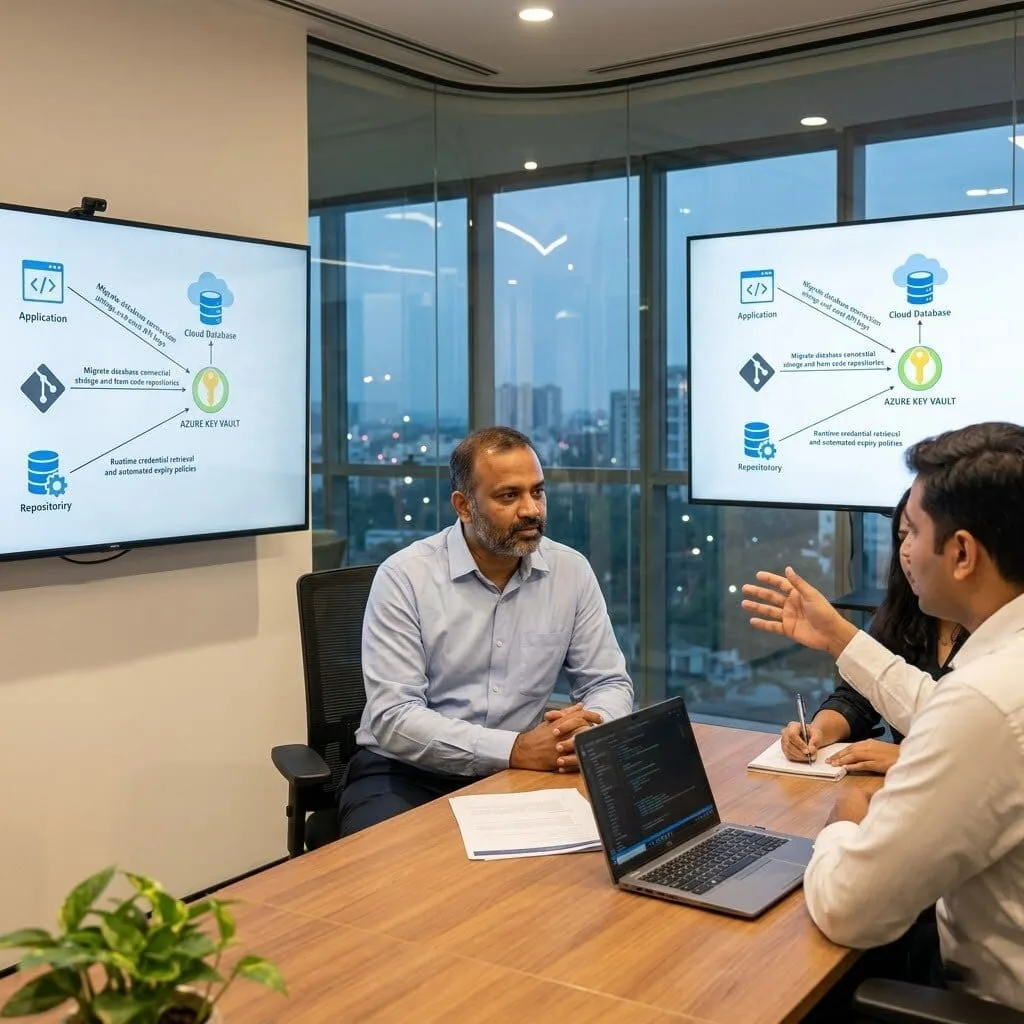
The vorza360 Solution: We migrated all application secrets into Azure Key Vault. We reconfigured his apps to use Azure SQL Single Database settings that pull credentials securely at runtime. We also set up “Expiry Policies” for his database certificates, so the system automatically refreshes its own security “locks” every few months.
The Result: Sensitive secrets were completely removed from his code and configuration files. Pavan’s team can now sleep soundly knowing that even if their code is leaked, his database passwords remain locked in a secure vault that only authorized apps can reach.
Markus Lindqvist (Finland)
The Challenge: Markus had inconsistent security rules. Some staff needed an MFA code to see the database, while others (including some high-level admins) didn’t. This “gap” in his security wall was a major red flag during a recent audit.
The vorza360 Solution: We rebuilt his Conditional Access policies from the ground up. We ensured that everyone, especially database admins, must use MFA to access the data. We also blocked “Legacy Authentication,” which is an old way of connecting that hackers often use to bypass modern security.
The Result: MFA is now a hard requirement across the entire company. Markus’s security team has a clear, documented design that is easy to audit. By closing these gaps, they successfully stopped credential-stuffing attacks that had been a secondary worry for the team.
Tunde Olatunji (Nigeria)
The Challenge: Tunde had a “Security Watchtower” (Microsoft Sentinel) running for eight months, but it was silent. It was collecting logs, but no one was looking at them, and it wasn’t alerting anyone when suspicious activity happened on their SQL databases.
The vorza360 Solution: We tuned his 24/7 Monitoring tools to look for real threats. We configured specific “Alert Rules” that trigger if someone tries to log into his Azure SQL Database from a strange country or at a weird time. We also set up a morning “Security Pulse” report so his team knows exactly what happened while they were asleep.
The Result: Within one week, the system caught a genuine compromised account and blocked it. Tunde’s investment is finally doing its job, protecting his data and providing real value. His team now responds to real threats in minutes rather than discovering them months too late.
vorza360’s Tech Edge
Azure SQL Single Database
Elastic Pools
Automated Backups
+ 2
More
Geo-Replication
Query Performance Insights
vorza360’s Tech Edge
Azure SQL Single Database
We provide a dedicated, isolated home for your most important applications, giving you guaranteed power and performance.
Elastic Pools
A smart way for us to manage multiple databases together, helping you stay within your budget while handling “spikes” in user activity.
Automated Backups
We take the worry out of data loss by setting up a consistent Azure SQL database backup schedule that saves your work every few minutes.
Geo-Replication
To protect you from major outages, we can “mirror” your data in a different part of the world, so your business stays live even if a data center goes offline.
Query Performance Insights
We act as your database “doctor,” using smart tools to monitor your system’s pulse and keep everything running at peak efficiency.
How we do it
We treat your data like the heart of your business, ensuring it is always healthy and accessible.
Creative Approaches
We don’t just “store” data; we use Elastic Pools to share resources between multiple databases, ensuring you get top speed during busy times without paying for extra “space” when things are quiet.
Insightful Strategies
Our team uses Query Performance Insights to watch how your data moves. We identify slow spots and fix them, so your apps and reports always load in an instant.
Tailored Solutions
Whether you need to connect to an Azure SQL database from a local office or a global app, we build a custom connection plan that is both easy to use and incredibly secure.
Creative Approaches
We don’t just “store” data; we use Elastic Pools to share resources between multiple databases, ensuring you get top speed during busy times without paying for extra “space” when things are quiet.
Insightful Strategies
Our team uses Query Performance Insights to watch how your data moves. We identify slow spots and fix them, so your apps and reports always load in an instant.
Tailored Solutions
Whether you need to connect to an Azure SQL database from a local office or a global app, we build a custom connection plan that is both easy to use and incredibly secure.
Our Service Cycle
We follow a clear path to ensure your SQL Azure database backup and management is perfect.
Step 1
Data Assessment
Step 2
Secure Migration
Step 3
Performance Tuning
Step 4
Safety Setup
Step 5
Connection Support
Step 6
24/7 Monitoring
Step 1
Data Assessment
We look at your current data needs to find the best Azure SQL database service for your goals.
Step 2
Secure Migration
Our team carefully moves your information into the cloud with zero data loss.
Step 3
Performance Tuning
We adjust your settings to make sure your searches and reports are lightning-fast.
Step 4
Safety Setup
We configure a reliable backup Azure SQL database plan to act as your ultimate safety net.
Step 5
Connection Support
We help your team and apps connect to Azure SQL database securely and easily.
Step 6
24/7 Monitoring
We stay on guard, using Azure backup SQL database tools to ensure your data is always protected and ready.
Why Choose vorza360 for This Service?
We provide a worry-free, fully managed data solution that keeps your information safe and your systems fast, acting as your expert partner so you never have to manage a database alone.
We Guard Your Data
Our focus is on providing a secure, “set-it-and-forget-it” experience so you never have to worry about losing a single customer record.
Cost-Smart Solutions
We help you avoid the high costs of physical servers by providing Azure free SQL database guidance and cost-effective scaling plans.
Your Technical Partner
vorza360 provides the service of a full-time database team at a fraction of the cost, handling the updates and security so you don’t have to.
Here is what our Clients are saying About us
Mikael Saarinen (Finland)
Our Azure SQL Database had been provisioned at a fixed tier that was either too much or too little depending on the time of day. vorza360 migrated us to the serverless tier with appropriate min and max vCore settings. Our database cost dropped significantly during off-peak hours without any performance impact during busy periods.
Noura Al-Farsi (UAE)
vorza360 optimised our Azure SQL Database performance after query response times had been degrading as our data volume grew. They analysed Query Store data, added missing indexes, rewrote several poorly performing queries, and configured the automatic tuning features correctly. Performance returned to acceptable levels within hours.
Alexandru Stancu (Romania)
Our Azure SQL geo-replication had been configured but never tested. vorza360 ran a failover test, discovered the replica was significantly behind due to a misconfiguration, fixed the replication setup, and validated the failover worked correctly before we returned to normal operations. A critical gap closed.
Ananya Krishnan (India)
vorza360 set up Azure SQL elastic pools for our multi-tenant application where different tenant databases had very different and variable load patterns. The elastic pool approach they recommended means databases share resources efficiently and our per-tenant database cost is significantly lower than dedicated provisioning.
Rasmus Christensen (Denmark)
vorza360 implemented proper Azure SQL Database auditing and threat detection for our environment after a compliance review flagged the absence of database-level logging. The audit configuration they put in place satisfies our compliance requirements and has already flagged one unusual access pattern worth investigating.
Chioma Okonkwo (Nigeria)
vorza360 set up automated Azure SQL Database backups with long-term retention policies that meet our data protection requirements without us having to think about it. They also documented and tested the point-in-time restore process so our team knows exactly what to do when a restore is needed.
More about Microsoft Azure
Azure Virtual Machines
Scale your business effortlessly with vorza360’s expert Azure virtual machine services.
Got questions? We’ve got answers. Find everything you need to know about using our platform, plans, and features
What is Azure SQL Database and how does it differ from SQL Server on an Azure VM?
Azure SQL Database is Microsoft’s fully managed cloud database service, a PaaS offering where Microsoft handles the database engine, OS patching, backups, high availability, and failover automatically, while you manage only the database schema, data, and performance tuning. SQL Server on an Azure VM is an IaaS approach where you run the full SQL Server product inside a virtual machine, giving you complete control over every aspect but also full responsibility for OS maintenance, SQL Server patching, backup configuration, and availability setup. vorza360 recommends Azure SQL Database for most new workloads because it eliminates operational overhead, Microsoft applies patches and maintains the underlying infrastructure, while providing enterprise features including built-in high availability with 99.99 percent SLA, automatic backups with point-in-time restore up to 35 days, automatic performance optimization, and built-in threat detection. SQL Server on VM is appropriate when your application requires OS-level access, specific SQL Server versions with features not yet available in PaaS, or cross-database queries that PaaS isolation prevents.
How does vorza360 configure Azure SQL Database for high performance?
Azure SQL Database performance optimization starts with correct service tier selection and continues through ongoing index management and query tuning. vorza360 configures Azure SQL Database for performance by selecting the appropriate service tier: the General Purpose tier for most business applications where the workload has variable compute needs and occasional I/O peaks; the Business Critical tier for mission-critical applications requiring in-memory OLTP capabilities, faster SSD storage, and read scale-out to replicas; or the Hyperscale tier for very large databases (up to 100TB) or applications requiring extremely fast read scale-out. We enable Query Performance Insight which identifies the top resource-consuming queries, and configure Automatic Tuning (Azure SQL’s machine learning-driven feature that automatically creates and drops indexes based on query execution patterns). We implement connection pooling at the application layer to avoid connection exhaustion, and configure the appropriate elastic pool configuration for multi-tenant applications sharing database resources.
How does vorza360 implement Azure SQL Database security to protect sensitive data?
Azure SQL Database security is implemented through multiple complementary controls that vorza360 configures comprehensively. At the network layer, we configure server-level firewall rules to restrict database access to specific IP addresses (application server IPs only, not the public internet), implement Virtual Network service endpoints or Private Endpoints to route database traffic through the Azure private network rather than the public internet. At the authentication layer, we use Azure Active Directory authentication for applications and administrators rather than SQL authentication where possible, enabling seamless MFA for administrative access. We enable Azure Defender for SQL which provides continuous monitoring for SQL injection attempts, suspicious access patterns, and unusual query behavior, generating alerts for the security team. We implement Transparent Data Encryption (TDE) for data at rest and enforce TLS for all connections. For highly sensitive data, we configure Azure SQL Always Encrypted to protect specific columns with client-side encryption that prevents even database administrators from seeing the encrypted values.
How does vorza360 set up Azure SQL Database backup and disaster recovery?
Azure SQL Database includes automated backups managed by Microsoft, full backups weekly, differential backups every 12 hours, and transaction log backups every 5 to 10 minutes, retained for 7 to 35 days depending on the service tier, providing point-in-time restore to any moment within the retention window. vorza360 configures Azure SQL Database backup and disaster recovery beyond the built-in defaults: we set the backup retention period to the maximum appropriate for your compliance requirements (35 days for critical databases). For disaster recovery across Azure regions, we configure Active Geo-Replication which maintains a continuously synchronized readable secondary replica in a different Azure region, providing a secondary database that can be promoted to primary within seconds using a failover operation if the primary region becomes unavailable. For automatic failover without manual intervention, we configure Auto-Failover Groups which provide an automatic failover policy and a single connection string that automatically redirects to the secondary after failover.
How does vorza360 migrate an on-premises SQL Server database to Azure SQL Database?
Migrating from on-premises SQL Server to Azure SQL Database involves assessing compatibility, resolving any incompatibilities, and executing the migration with minimal downtime. vorza360 manages this migration through a structured process: we use the Data Migration Assistant (DMA) to perform a compatibility assessment, Azure SQL Database does not support all SQL Server features (certain deprecated features, SQL Server Agent jobs, cross-database transactions), and the assessment identifies any code changes or feature replacements needed before migration. We resolve all identified compatibility issues in the source database. For the actual migration, we use the Azure Database Migration Service (DMS) in online migration mode for databases that cannot tolerate extended downtime, DMS continuously replicates changes from the on-premises source to Azure SQL Database, and the final cutover (pointing the application to the new database) can be performed with minimal interruption, typically under five minutes.