Scale your business effortlessly with vorza360’s expert Azure virtual machine services. We provide flexible, secure, and high-performance cloud computing solutions tailored to your unique needs.
The Challenge: Thomas’s company had migrated workloads to Azure VMs but had sized every VM generously ‘to be safe’, the result was a monthly Azure bill significantly over budget, with most VMs running well below their allocated resources. Nobody had reviewed VM sizing since the migration.
The vorza360 Solution: vorza360 performed an Azure compute rightsizing assessment using 30 days of utilisation data from Azure Monitor. Each VM was categorised by its actual peak utilisation and a rightsizing recommendation was produced. Recommendations were implemented in order of cost impact, with testing after each resize to confirm application performance was maintained.
The Result: Monthly Azure VM costs reduced by 38% after implementing the rightsizing recommendations. Thomas’s team completed the exercise that had been on the backlog for months, and the process was documented so VM sizing would be reviewed quarterly rather than being left to accumulate savings opportunities.
Sara Al-Mansoori (Qatar)
The Challenge: Sara’s company needed Azure VMs deployed for their application environment but their previous self-managed deployment had left VMs without proper backup, no monitoring, and inconsistent OS patch management. They wanted a deployment that addressed all of these from the start.
The vorza360 Solution: vorza360 deployed their Azure VM environment with an operations-ready approach: Azure Backup configured for all VMs before go-live, Azure Monitor with alerting for VM health and performance, Update Management configured for automated security patching, and Azure Defender for Servers enabled for threat detection.
The Result: The application launched on Azure VMs that were properly managed from day one. Sara’s operations team had backup, monitoring, and patching in place before the first user connected, which was the contrast with their previous deployment she had specifically asked for.
Bogdan Florescu (Romania)
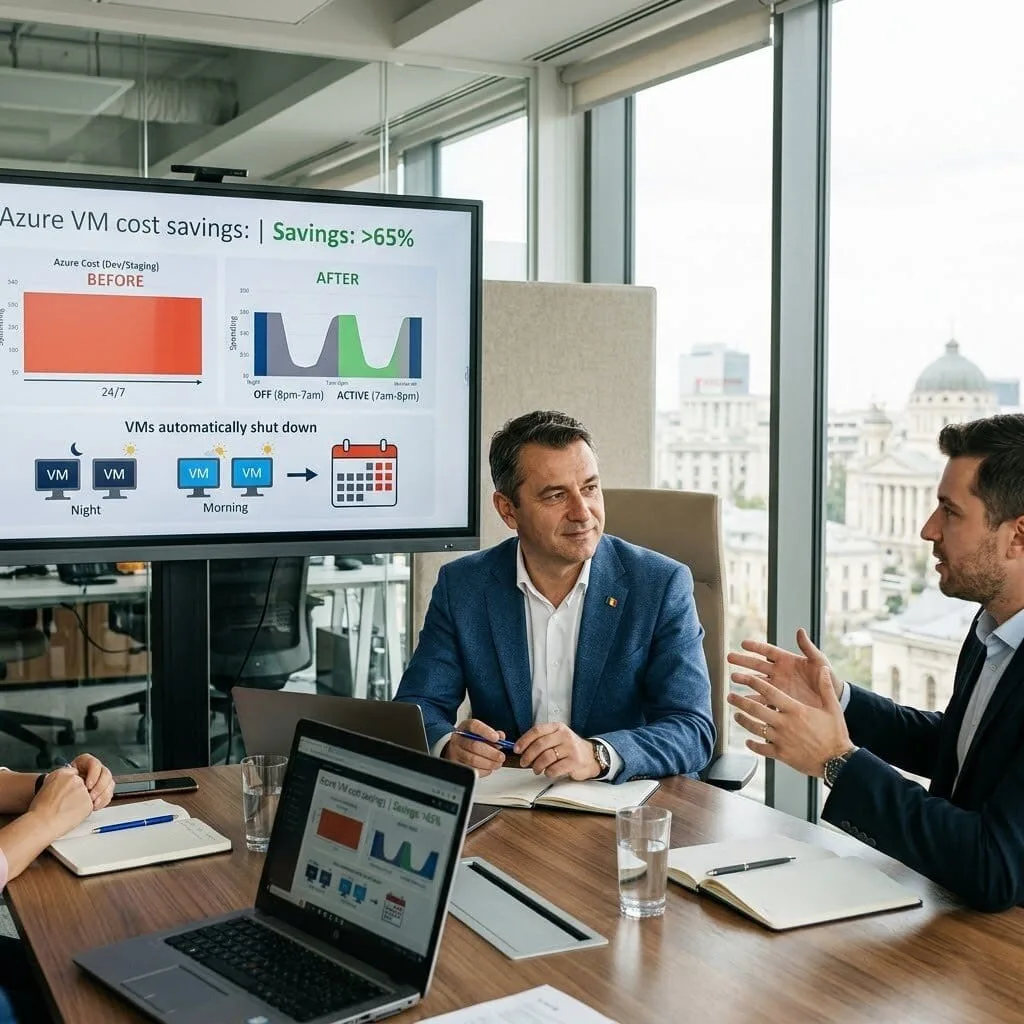
The Challenge: Bogdan’s company had Azure VMs running their development and staging environments that were left running around the clock, consuming budget even when developers weren’t working. Weekend and overnight compute costs were a significant part of their Azure bill for no productive reason.
The vorza360 Solution: vorza360 implemented Azure Automation runbooks with schedules to shut down development and staging VMs outside working hours and restart them at the beginning of the working day. Dev VMs were shut down at 8pm and restarted at 7am on weekdays, with full shutdown over weekends.
The Result: Development and staging VM costs reduced by over 65% as the machines ran only during working hours. Bogdan’s team achieved the cost reduction without any impact on developer productivity, the VMs were ready when developers started each morning, and developers could manually override the schedule for the occasional evening or weekend work.
Aditya Kumar (India)
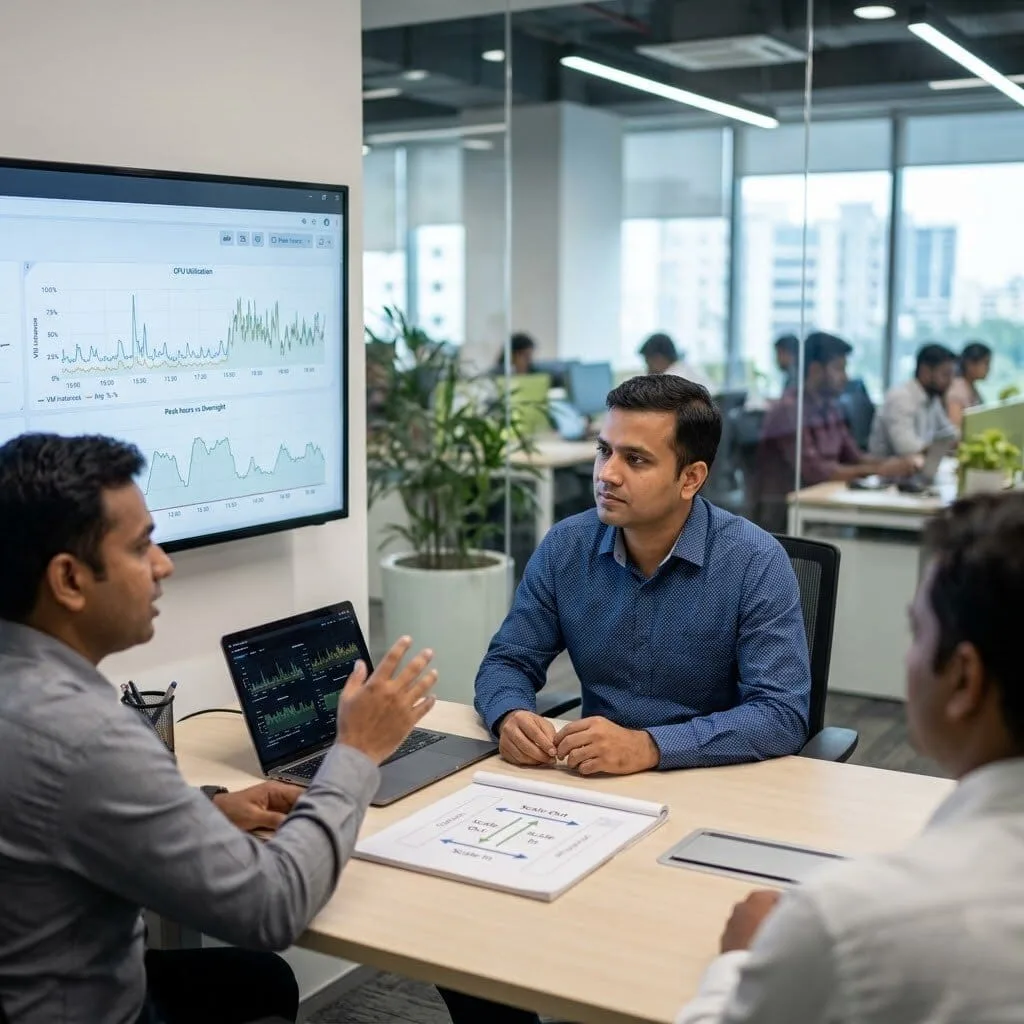
The Challenge: Aditya’s company was running a workload on Azure VMs that needed to scale during business hours when load was high but didn’t need that capacity overnight. They were paying for peak-capacity VMs around the clock, which was three times more expensive than the workload warranted.
The vorza360 Solution: vorza360 implemented Azure Virtual Machine Scale Sets for their application tier with autoscaling rules based on CPU utilisation metrics: scale out when CPU exceeded 70% for five minutes, scale in when it dropped below 30% for ten minutes. A minimum of two instances maintained availability at all times.
The Result: The application scaled automatically with demand, running minimum capacity overnight and scaling to meet peak business-hours load without manual intervention. Aditya’s Azure compute costs reduced by 55% compared to the fixed peak-capacity allocation, and the autoscaling handled traffic spikes that had previously required manual VM additions.
Linnea Johansson (Sweden)
The Challenge: Linnea’s company had Azure VMs for their web application but no Azure load balancer, traffic went to a single VM and there was no failover if it became unavailable. The single-VM architecture had caused two brief outages when the VM needed rebooting for OS updates.
The vorza360 Solution: vorza360 deployed an Azure Application Gateway in front of their web tier, configured health probes for each backend VM, and added a second VM to the backend pool. Update Management was configured to stagger OS update reboots so that both VMs were never being updated simultaneously.
The Result: The web application had genuine availability without single-VM dependency. The next OS update cycle was handled without any user-visible downtime as the VMs rebooted sequentially with the load balancer directing traffic away from each VM while it rebooted. Linnea’s two annual outages due to VM reboots became a thing of the past.
Adaobi Okafor (Nigeria)
The Challenge: Adaobi’s company was running on-premises Windows servers and needed to migrate to Azure VMs. They had no Azure experience and were concerned about the migration complexity, specifically about maintaining their Active Directory, their file share access, and their application connectivity during and after the migration.
The vorza360 Solution: vorza360 executed the migration using Azure Migrate: assessment of on-premises VMs, replication to Azure in parallel with production operation, AD extended to Azure with a domain controller deployed before any workloads migrated, and a phased migration that moved each workload with tested connectivity before decommissioning on-premises.
The Result: The migration to Azure VMs completed without any disruption to Adaobi’s staff. Active Directory, file access, and application connectivity all worked correctly in Azure because each dependency was established before the dependent workloads were moved. The on-premises servers were decommissioned on schedule, reducing infrastructure costs immediately.
vorza360’s Tech Edge
Azure Compute VM Series
Managed OS Disks
Availability Sets & Zones
+ 2
More
VM Scale Sets
Custom Image Deployment
vorza360’s Tech Edge
Azure Compute VM Series
We help you choose the best Windows Azure virtual machine from a wide range of sizes, ensuring you have the exact power you need without overpaying.
Managed OS Disks
Our team handles the setup of high-speed storage for your servers, so your applications always load quickly and reliably.
Availability Sets & Zones
We design your system so it stays online even if a Microsoft data center faces a hiccup, giving you true peace of mind.
VM Scale Sets
Using Azure virtual machine scale sets, we create systems that automatically add more power during busy times and shrink back down to save you money when things are quiet.
Custom Image Deployment
We build “digital blueprints” of your perfect setup, allowing us to launch new Microsoft Azure virtual machines for your team in minutes.
Windows Cloud Desktop Solutions
We provide a familiar Windows experience in the cloud, allowing your team to work securely from any device, anywhere.
Advantages
Professional setup of Azure Windows virtual machines.
Secure remote access for your entire team.
Support for all your essential office apps.
Regular security patches and updates.
Easy-to-manage user permissions.
Specialized Database Hosting
For businesses that rely on data, we provide high-performance environments that keep your records safe and accessible.
Advantages
Expert configuration of Azure Windows virtual machine with SQL.
Fast data processing for large inventories.
Built-in protection against data loss.
Optimized settings for smooth app performance.
24/7 monitoring of your database health.
Flexible Linux Environments
We support open-source growth by providing stable and secure cloud spaces for your web developers and technical tools.
Advantages
Deployment of various Azure Linux virtual machines.
Perfect for hosting websites and custom apps.
Lightweight and cost-effective setups.
Seamless integration with popular dev tools.
Secure SSH access for your tech team.
Advanced Data Protection
We ensure your business never loses a day of work with smart, automated backup and recovery solutions.
Advantages
Reliable Azure virtual machine backup scheduling.
Off-site storage for maximum safety.
Regular testing of your "backup plan."
Secure encryption to keep your data private.
Quick recovery if a file is accidentally deleted.
Cost-Optimized Computing
We help you save on your cloud bill by using smart strategies like Azure spot virtual machines for non-urgent tasks.
Advantages
Identifying ways to lower your monthly costs.
Using "spare" cloud capacity for big savings.
Automated "off" switches for when you aren't working.
Clear reporting on where your budget is going.
Helpful Azure virtual machine services tailored to your budget.
Windows Cloud Desktop Solutions
We provide a familiar Windows experience in the cloud, allowing your team to work securely from any device, anywhere.
ADVANTAGES
Professional setup of Azure Windows virtual machines.
Secure remote access for your entire team.
Support for all your essential office apps.
Regular security patches and updates.
Easy-to-manage user permissions.
Specialized Database Hosting
For businesses that rely on data, we provide high-performance environments that keep your records safe and accessible.
ADVANTAGES
Expert configuration of Azure Windows virtual machine with SQL.
Fast data processing for large inventories.
Built-in protection against data loss.
Optimized settings for smooth app performance.
24/7 monitoring of your database health.
Flexible Linux Environments
We support open-source growth by providing stable and secure cloud spaces for your web developers and technical tools.
ADVANTAGES
Deployment of various Azure Linux virtual machines.
Perfect for hosting websites and custom apps.
Lightweight and cost-effective setups.
Secure SSH access for your tech team.
Seamless integration with popular dev tools.
Advanced Data Protection
We ensure your business never loses a day of work with smart, automated backup and recovery solutions.
ADVANTAGES
Reliable Azure virtual machine backup scheduling.
Quick recovery if a file is accidentally deleted.
Off-site storage for maximum safety.
Regular testing of your "backup plan."
Secure encryption to keep your data private.
Cost-Optimized Computing
We help you save on your cloud bill by using smart strategies like Azure spot virtual machines for non-urgent tasks.
ADVANTAGES
Identifying ways to lower your monthly costs.
Using "spare" cloud capacity for big savings.
Automated "off" switches for when you aren't working.
Clear reporting on where your budget is going.
Helpful Azure virtual machine services tailored to your budget.
Here is what our Clients are saying About us
Teemu Leinonen (Finland)
We’d been running oversized Azure VMs because nobody had properly assessed our actual workload requirements. vorza360 audited our entire VM estate, right-sized every instance, and set up auto-shutdown schedules for non-production machines. Our monthly Azure bill dropped by nearly 35% without any impact on performance.
Hessa Al-Kuwari (Qatar)
vorza360 migrated our on-premises servers to Azure Virtual Machines in a phased approach that kept our business running throughout. Each workload was assessed, the right VM size selected, and the migration executed cleanly. We were fully cloud-hosted ahead of schedule with no data loss and minimal downtime.
Vlad Ionescu (Romania)
Our Azure VM environment had grown without any governance, inconsistent naming, no tagging, random resource group structure. vorza360 reorganised everything, applied a consistent tagging policy, and set up Azure Policy to enforce standards going forward. Finally an environment our team can navigate and manage confidently.
Arjun Bhatia (India)
vorza360 configured Azure VM scale sets for our application tier so our compute capacity scales automatically with demand. We’d been manually resizing VMs during traffic spikes and missing the window every time. The auto-scaling they set up means we never overpay during quiet periods or underperform during busy ones.
Astrid Magnusson (Sweden)
vorza360 set up Azure Bastion for secure VM access across our entire estate, removing the need for public RDP and SSH endpoints entirely. The ‘no-exposed-management-ports’ architecture they built removed one of the most commonly exploited attack vectors from our environment without any loss of operational capability.
Taiwo Adewale (Nigeria)
vorza360 implemented Azure Reserved Instances for our stable production VMs after analysing our usage patterns over three months. The commitment pricing they recommended based on actual data rather than guesswork has reduced our compute costs significantly. A well-evidenced recommendation that’s paid off exactly as projected.
More about Microsoft Azure
Azure App Services
Launch and grow your web applications effortlessly with vorza360’s expert Azure app…
Got questions? We’ve got answers. Find everything you need to know about using our platform, plans, and features
What is an Azure Virtual Machine and what business workloads is it best suited for?
An Azure Virtual Machine (VM) is an on-demand, scalable compute resource in Microsoft’s cloud that runs Windows or Linux operating systems, essentially a server in the cloud that you can provision, configure, and control exactly like an on-premises physical server, without the capital cost and maintenance overhead of owning hardware. Azure VMs are best suited for: lifting-and-shifting existing on-premises server workloads to the cloud without code changes; hosting applications that require specific operating system versions or configurations; running databases (SQL Server, Oracle, MySQL) with custom performance tuning not available in managed database services; development and testing environments that can be shut down when not in use to save costs; and line-of-business applications that require Windows Server roles or services. vorza360 provisions and configures Azure VMs to match your workload requirements precisely, right-sized, secured, and optimized from day one.
How does vorza360 select the right Azure VM size and series for a workload?
Azure offers hundreds of VM sizes across specialized series, choosing the wrong one results in either overpaying for capacity you do not use or under-provisioning a workload that degrades under load. vorza360 selects Azure VM sizes by matching the workload’s resource profile to the appropriate series: General Purpose (D-series, B-series) for balanced CPU/memory ratios suitable for web servers, application servers, and development environments; Compute Optimized (F-series) for compute-intensive applications requiring high CPU performance; Memory Optimized (E-series, M-series) for in-memory databases, SAP HANA, and large caches; Storage Optimized (L-series) for big data and high disk throughput workloads; GPU-enabled (NV, NC-series) for machine learning and graphics rendering. We use Azure Advisor and Azure Migrate assessment data to validate our sizing recommendations against real workload metrics before committing to a specific VM series.
How does vorza360 configure Azure VMs for high availability and resilience?
A single Azure VM, like a single physical server, is a single point of failure, Azure’s SLA for a single VM is 99.9 percent, which allows for approximately 8.7 hours of downtime per year. For business-critical workloads requiring higher availability, vorza360 implements Azure VM high availability through Availability Sets (which distribute VMs across fault domains and update domains within a data center, providing 99.95 percent SLA for multi-VM deployments), Availability Zones (which distribute VMs across physically separate data center facilities within an Azure region, providing 99.99 percent SLA), or Azure Site Recovery (which replicates VMs to a secondary region for disaster recovery with defined recovery time objectives). We also implement Azure Backup for all production VMs on a policy-driven schedule, providing point-in-time recovery capability for both OS and data disks.
How does vorza360 secure Azure Virtual Machines against unauthorized access and threats?
Azure VM security requires both network-level controls and OS-level hardening. vorza360 secures Azure VMs comprehensively: at the network layer, we configure Network Security Groups (NSGs) with rules that restrict inbound traffic to only the specific ports and source IP addresses legitimate for each VM’s role, removing the default allow-all rules that expose VMs to the internet. We enable Azure Defender for Servers (part of Microsoft Defender for Cloud) which provides continuous threat detection, just-in-time VM access (temporarily opening management ports only when needed and only for specific authorized IPs), and adaptive application controls. We disable direct RDP and SSH access from the internet, instead requiring Azure Bastion (a PaaS service providing browser-based secure access without exposing management ports), and we implement Azure Policy to enforce security baselines across all VMs in the subscription.
How does vorza360 optimize Azure VM costs without compromising performance?
Azure VM costs are one of the largest line items in most organizations’ cloud bills, and several optimization strategies deliver significant savings without impacting production workloads. vorza360 implements VM cost optimization through: Azure Reserved Virtual Machine Instances for production VMs with predictable, consistent usage, committing to 1 or 3-year terms in exchange for 40 to 72 percent discounts over pay-as-you-go. Azure Hybrid Benefit for organizations with existing Windows Server or SQL Server Software Assurance licenses, allowing those licenses to be applied to Azure VMs for substantial additional savings. Azure Spot VMs for non-critical, interruptible workloads such as batch processing, development environments, and fault-tolerant applications, providing access to unused Azure compute capacity at up to 90 percent discount. Auto-shutdown schedules for all non-production VMs during evenings and weekends, eliminating charges during hours when the resources are idle.