Keep your business communication running smoothly with vorza360’s expert exchange online support services. We manage your mail flow, security, and outlook settings so you never miss an important message.
The Challenge: Klaus’s company had migrated to Exchange Online but email delivery was inconsistent, some messages were delayed by hours, others were landing in recipients’ spam folders, and their email reputation had deteriorated after a period where a compromised account had sent bulk spam.
The vorza360 Solution: vorza360 investigated the mail flow issues: corrected the SPF, DKIM, and DMARC records that had been incorrectly configured during migration, removed the compromised account and reset all credentials, implemented a DMARC policy progressing to reject, and configured Exchange Online Protection policies to reduce the risk of future account compromise-based spam sending.
The Result: Email deliverability improved within 48 hours of the DNS record corrections. Spam folder delivery rates dropped significantly as their domain reputation recovered under the correct authentication records. Klaus’s organisation had email authentication configured correctly for the first time, meeting the standards that major email providers now require.
Hessa Al-Mansouri (UAE)
The Challenge: Hessa’s company was experiencing email flow problems after an Exchange Online tenant configuration change had been made without full understanding of the implications. Mail flow rules were blocking legitimate internal messages, and external email to specific domains was failing entirely.
The vorza360 Solution: vorza360 reviewed the Exchange Online configuration, identified the mail flow rule that was incorrectly matching internal messages, traced the external delivery failure to a misconfigured connector that had been created for a third-party service but was intercepting external mail traffic, and corrected both issues with testing at each step.
The Result: Both mail flow issues were resolved within one day. Hessa’s team had a clear explanation of what had gone wrong and why, and the corrected configuration was documented so future changes would be made with understanding of the potential impacts.
Silviu Ionescu (Romania)
The Challenge: Silviu’s company had shared mailboxes that were not properly managed, former employees still had access, some shared mailboxes had no designated owner, and several mailboxes that should have been shared were individual licensed mailboxes consuming unnecessary licenses.
The vorza360 Solution: vorza360 audited all shared mailboxes, removed access for former employees, assigned ownership and appropriate delegate permissions to the remaining mailboxes, converted the individual licensed mailboxes that met the shared mailbox criteria to shared mailboxes (which don’t require separate licenses), and documented the access model for ongoing management.
The Result: License costs reduced as the unnecessary individual mailbox licenses were freed, and the access audit removed the former employee access that had been a security concern. Silviu’s team had a documented shared mailbox inventory with defined ownership for the first time, and ongoing management had a clear process.
Suresh Pillai (India)
The Challenge: Suresh’s company was receiving large volumes of phishing emails that were bypassing Exchange Online Protection and reaching users’ inboxes. Several users had clicked on phishing links, and IT was spending significant time on incident response rather than preventive controls.
The vorza360 Solution: vorza360 configured Microsoft Defender for Office 365: Safe Attachments policy detonating suspicious attachments before delivery, Safe Links rewriting and checking URLs at click time, anti-phishing policies with impersonation protection for executive accounts, and Attack Simulator for user awareness training.
The Result: Phishing email delivery rates dropped dramatically after Defender for Office 365 was properly configured. Users who clicked tested phishing links in Attack Simulator simulations were automatically enrolled in targeted awareness training. Suresh’s IT team spent significantly less time on phishing incident response as the preventive controls absorbed the attacks.
Gunnar Magnusson (Sweden)
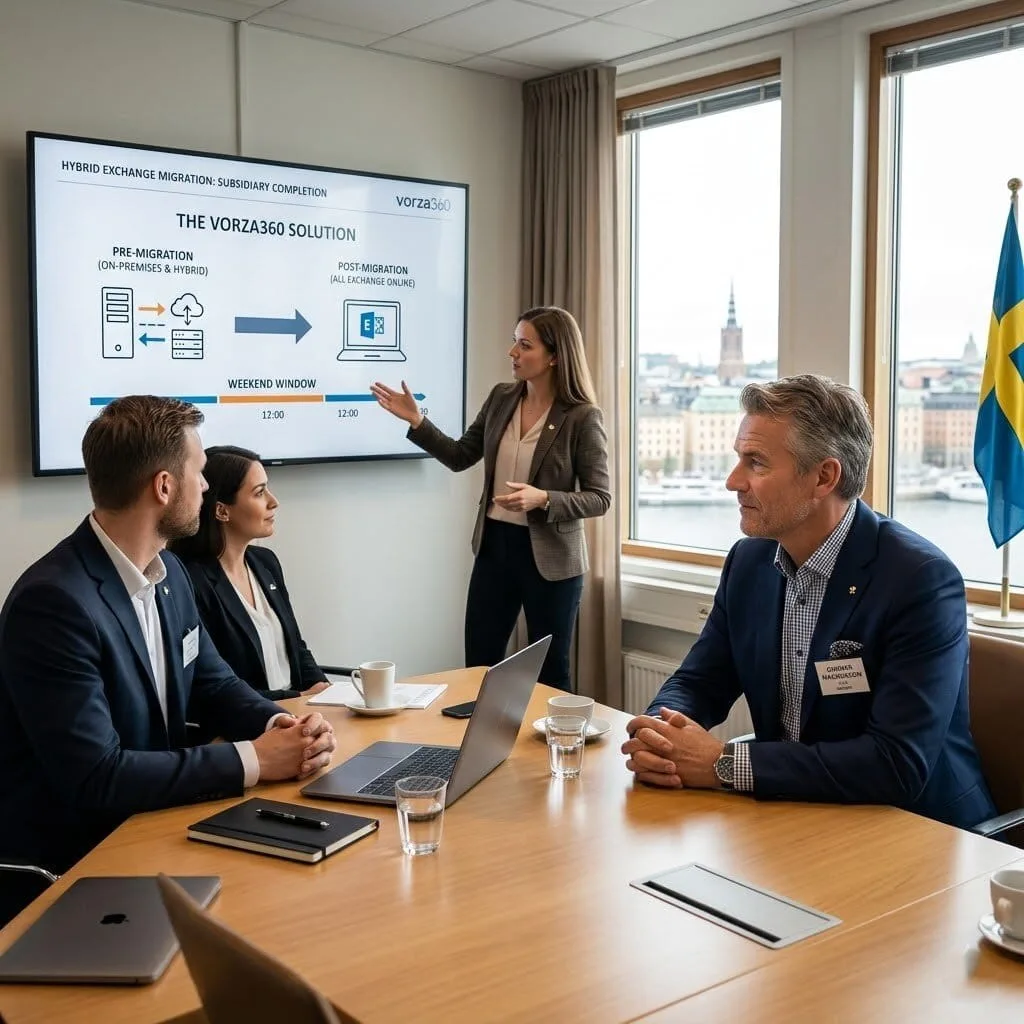
The Challenge: Gunnar’s company had Exchange Online for their main office but still ran on-premises Exchange for a subsidiary they had acquired. The hybrid coexistence had been running for two years with the intention of migrating the subsidiary, but every migration attempt had stalled on technical issues.
The vorza360 Solution: vorza360 assessed the hybrid Exchange configuration, identified the technical blockers that had been stalling the migration, primarily attribute synchronisation issues in Azure AD Connect and outdated hybrid configuration, corrected the underlying issues, and successfully migrated the subsidiary’s mailboxes to Exchange Online in a planned weekend window.
The Result: The two-year migration that had been repeatedly stalled was completed in a single weekend. Gunnar’s organisation was fully Exchange Online with no on-premises Exchange infrastructure to maintain, and the subsidiary’s users had the full Exchange Online feature set they had been waiting for.
Tunde Adeyemi (Nigeria)
The Challenge: Tunde’s company had email retention and eDiscovery requirements from a regulatory body that they hadn’t implemented in Exchange Online. When they received a regulatory inquiry requiring email records from a specific period, they discovered their Exchange Online tenant had no retention policies and emails older than the mailbox limit had been deleted.
The vorza360 Solution: vorza360 implemented Microsoft 365 Compliance features: Exchange Online retention policies aligned to their regulatory requirements, Litigation Hold on executive mailboxes, and eDiscovery cases for the immediate regulatory inquiry. They also recovered what email records were available from available backups and audit logs.
The Result: Tunde’s company had the compliance infrastructure their regulatory requirements demanded, implemented before the next potential inquiry. The immediate inquiry was responded to with the available records and a documented account of the retention policy gap that had existed, and was now resolved. Future regulatory inquiries would be responded to from a complete email archive.
vorza360’s Tech Edge
Exchange Admin Center (EAC)
Mail Flow Rules
Shared & Resource Mailboxes
+ 2
More
Anti-Spam & Anti-Malware Policies
Exchange Online PowerShell
vorza360’s Tech Edge
Exchange Admin Center (EAC)
Our team uses this central dashboard to manage your mailboxes, monitor your system’s health, and update your settings instantly.
Mail Flow Rules
We create custom “rules” for your email, such as automatically forwarding specific messages or adding professional disclaimers to every outgoing mail.
Shared & Resource Mailboxes
We set up collaborative mailboxes (like info@yourcompany.com) and room bookings, allowing your team to work together without sharing passwords.
Anti-Spam & Anti-Malware Policies
We act as your digital shield, using advanced filters to block junk mail and dangerous attachments before they ever reach your inbox.
Exchange Online PowerShell
For complex tasks, we use expert coding to automate your email management, saving time and reducing errors across your entire company.
Professional Outlook Support
We ensure your team can access their mail perfectly across all their devices, whether at the office or on the go.
Advantages
Setup and troubleshooting for exchange online outlook support.
Syncing your email, calendar, and contacts across mobile and desktop.
Resolving "cannot connect" or "password" errors instantly.
Guidance on using advanced Outlook features to stay organized.
Reliable exchange online outlook client support for your staff.
Secure Mailbox Management
vorza360 handles the daily “heavy lifting” of managing your user accounts and their private data.
Advantages
Creating and deleting user mailboxes as your team grows.
Managing mailbox sizes and archiving old emails to save space.
Setting up "Send As" permissions for executive assistants.
Restoring deleted emails or mailboxes in case of accidents.
Providing a high-quality Microsoft exchange online support service.
Advanced Threat Protection
We keep your inbox safe from hackers, phishing, and viruses using multi-layered security.
Advantages
Daily monitoring of your anti-spam and anti-malware policies.
Blocking suspicious links and attachments automatically.
Identifying and stopping "spoofing" (emails pretending to be from you).
Constant updates to protect against the latest email threats.
Keeping your business compliant with data safety rules.
Efficient Mail Flow & Routing
We ensure your emails always go to the right place at the right time with smart routing.
Advantages
Customizing how mail travels in and out of your company.
Managing "Distribution Groups" so one email reaches the whole team.
Setting up automated "Out of Office" and "Welcome" replies.
Tracking lost or "stuck" messages to get them moving again.
Expert Microsoft online exchange support for complex mail rules.
Collaborative Shared Spaces
vorza360 helps your team work better together by creating shared areas for communication and scheduling.
Advantages
Setup of shared mailboxes for "Sales" or "Support" teams.
Management of "Resource Mailboxes" for booking meeting rooms or cars.
Shared calendars to see when your teammates are free.
Global Address Lists so everyone can find any contact instantly.
Accessible Microsoft exchange online support number for your team.
Professional Outlook Support
We ensure your team can access their mail perfectly across all their devices, whether at the office or on the go.
ADVANTAGES
Setup and troubleshooting for exchange online outlook support.
Syncing your email, calendar, and contacts across mobile and desktop.
Resolving "cannot connect" or "password" errors instantly.
Guidance on using advanced Outlook features to stay organized.
Reliable exchange online outlook client support for your staff.
Secure Mailbox Management
vorza360 handles the daily “heavy lifting” of managing your user accounts and their private data.
ADVANTAGES
Creating and deleting user mailboxes as your team grows.
Managing mailbox sizes and archiving old emails to save space.
Setting up "Send As" permissions for executive assistants.
Restoring deleted emails or mailboxes in case of accidents.
Providing a high-quality Microsoft exchange online support service.
Advanced Threat Protection
We keep your inbox safe from hackers, phishing, and viruses using multi-layered security.
ADVANTAGES
Daily monitoring of your anti-spam and anti-malware policies.
Blocking suspicious links and attachments automatically.
Identifying and stopping "spoofing" (emails pretending to be from you).
Keeping your business compliant with data safety rules.
Constant updates to protect against the latest email threats.
Efficient Mail Flow & Routing
We ensure your emails always go to the right place at the right time with smart routing.
ADVANTAGES
Customizing how mail travels in and out of your company.
Setting up automated "Out of Office" and "Welcome" replies.
Managing "Distribution Groups" so one email reaches the whole team.
Tracking lost or "stuck" messages to get them moving again.
Expert Microsoft online exchange support for complex mail rules.
Collaborative Shared Spaces
vorza360 helps your team work better together by creating shared areas for communication and scheduling.
ADVANTAGES
Setup of shared mailboxes for "Sales" or "Support" teams.
Management of "Resource Mailboxes" for booking meeting rooms or cars.
Shared calendars to see when your teammates are free.
Global Address Lists so everyone can find any contact instantly.
Accessible Microsoft exchange online support number for your team.
Here is what our Clients are saying About us
Tuomas Korhonen (Finland)
Our Exchange Online migration from on-premises had been done in a rush and left us with mail flow rules that made no sense, shared mailboxes nobody could access properly, and calendar permissions that were wrong across the board. vorza360 cleaned up the entire configuration and our email environment finally works the way it should.
Lina Al-Rashidi (Jordan)
vorza360 resolved a persistent mail delivery issue that had been bouncing emails from specific external domains for three weeks. Our previous IT provider had given up diagnosing it. vorza360 traced it to a misconfigured transport rule, fixed it in under an hour, and explained exactly what had caused it.
Florin Munteanu (Romania)
vorza360 set up Exchange Online shared mailboxes, distribution groups, and resource calendars for our new department structure. Everything was configured correctly with the right permissions from the start, a straightforward task done properly rather than the inconsistent setup we’d inherited from our previous provider.
Kavya Iyer (India)
vorza360 configured Exchange Online mail flow rules for our organisation that route, tag, and archive email according to our compliance requirements. The ‘compliant-by-default’ email handling they set up means our team doesn’t have to think about which emails need to be retained, the rules handle it automatically.
Nicolai Andersen (Denmark)
Our email deliverability had been suffering because our SPF, DKIM, and DMARC records were misconfigured. vorza360 audited our DNS records, corrected every issue, and verified deliverability improved before closing the engagement. Our emails stopped landing in spam for external recipients almost immediately.
Adaeze Nwosu (Nigeria)
vorza360 set up email archiving and litigation hold in Exchange Online for our legal team’s compliance requirements. They configured the policies correctly, explained how to use eDiscovery when needed, and documented everything clearly. Our legal team finally has confidence in our email compliance capabilities.
More about Microsoft 365 Services
SharePoint Online Support
Simplify your team’s teamwork with vorza360’s expert SharePoint online support.
Got questions? We’ve got answers. Find everything you need to know about using our platform, plans, and features
What does vorza360's Exchange Online support service cover?
Our Exchange Online support service covers every aspect of your organization’s cloud email environment. This includes mailbox provisioning and configuration for new users, shared mailbox setup for team inboxes, distribution list and Microsoft 365 Group management, email alias and forwarding configuration, mail flow rule creation for custom routing and compliance scenarios, spam and phishing filter policy management, email retention policy configuration, anti-malware protection via Microsoft Defender for Exchange, mobile device email access configuration, calendar sharing and resource mailbox setup for meeting rooms and equipment, external email relay configuration, DMARC, DKIM, and SPF record setup and management, message trace investigation for email delivery issues, and migration support for organizations moving from on-premises Exchange or other email platforms to Exchange Online.
How does vorza360 configure DMARC, DKIM, and SPF to protect against email spoofing?
Email authentication records, SPF, DKIM, and DMARC, are the three DNS-based mechanisms that prevent spammers and attackers from forging emails that appear to come from your domain. vorza360 configures all three in combination for complete protection: SPF is a TXT record listing mail servers authorized to send email on behalf of your domain, we configure it to include Microsoft 365’s sending infrastructure and any legitimate third-party services that send mail on your behalf. DKIM adds a cryptographic signature to outgoing emails verified against a public key in your DNS, we enable DKIM signing in Exchange Online and publish the required CNAME records. DMARC tells receiving mail servers what to do with email that fails SPF or DKIM checks, we configure a quarantine policy initially, moving to reject once we have confirmed all legitimate mail flows are unaffected. This three-layer combination provides comprehensive protection for your domain against spoofing.
How does vorza360 troubleshoot email delivery problems in Exchange Online?
Email delivery failures in Exchange Online can occur for multiple reasons, spam filter blocking, misconfigured mail flow rules, DNS issues, recipient policy problems, or sender reputation issues, and diagnosing the specific cause requires systematic investigation. vorza360 uses Exchange Online’s Message Trace tool as the primary diagnostic resource: this allows us to search for a specific message by sender, recipient, subject, and time range and see exactly what happened at each step through Exchange Online’s processing pipeline, whether it was delivered, rejected, quarantined, or redirected by a rule. We review the delivery status at each hop and the specific rejection reason or rule action applied. For external delivery failures, we check the sending domain’s DNS records, verify connector configuration for any hybrid mail flow scenarios, and review Delivery Reports for detailed non-delivery report error codes. We provide clear explanations of findings in plain language.
How does vorza360 configure Exchange Online shared mailboxes and distribution lists?
Shared mailboxes and distribution lists are among the most commonly requested Exchange Online configurations for team email management. vorza360 configures shared mailboxes by creating the mailbox in the Exchange Admin Center or via PowerShell, granting Full Access permissions to designated users who can read and send from the mailbox, configuring Send As or Send on Behalf permissions according to your team’s preference for how the From address should appear, and enabling auto-mapping so the shared mailbox appears automatically in Outlook for users with Full Access. For distribution lists, we create the group with the appropriate membership (static or dynamic with Azure AD rules), configure send restrictions, configure delivery settings, and advise on whether a Microsoft 365 Group might better serve your needs than a traditional distribution list.
How does vorza360 migrate email from an on-premises Exchange server or other provider to Exchange Online?
Email migration to Exchange Online is one of the most common Microsoft 365 projects vorza360 manages. For migrations from on-premises Exchange 2016 or 2019, we use Exchange Hybrid deployment, establishing coexistence between on-premises Exchange and Exchange Online that allows mailboxes to be migrated progressively in batches while both systems are operational, with transparent mail routing throughout. For organizations on older Exchange versions, Office 365 IMAP migration, or third-party email platforms, we use the Microsoft 365 Migration Manager or tools like BitTitan MigrationWiz. For small organizations under 150 mailboxes with no coexistence requirement, a cutover migration moves all mailboxes in a single event. We manage the DNS cutover timing, user communication, Outlook profile reconfiguration, and post-migration support to ensure a smooth transition with minimal user disruption.