Get total control over your business Wi-Fi with vorza360’s professional omada controller setup. We provide a central “brain” for your network, making it faster, more reliable, and easier to manage from anywhere.
The Challenge: Thomas’s company had deployed Omada APs across their three-floor office but was managing each AP individually through its local interface. Adding a new SSID meant touching every AP separately, and there was no centralised view of which clients were connected where.
The vorza360 Solution: vorza360 deployed the Omada Software Controller, adopted all existing APs, migrated the wireless configuration to controller-managed profiles, and configured dashboards and alert settings appropriate for their environment. They also trained the IT team on controller-based management.
The Result: Network-wide changes that had required touching 12 APs individually could now be made in seconds from one interface. Thomas’s IT team had a single view of all connected clients, RF environment data for troubleshooting, and automatic alerts for AP offline events.
Rania Al-Jadaan (Saudi Arabia)
The Challenge: Rania’s company was deploying Omada across multiple sites and needed a controller architecture that could manage all sites centrally while maintaining site-specific configuration, and where a controller outage would not affect client connectivity at any site.
The vorza360 Solution: vorza360 deployed Omada Controller in a cloud-hosted HA configuration, configured site-specific profiles for each location managed from a single controller instance, and verified that APs would continue operating with pre-configured settings if controller connectivity was temporarily lost.
The Result: Rania’s multi-site network was managed from a single interface with site-specific configuration maintained cleanly. When the controller had a brief connectivity issue, all sites continued operating without any client impact, AP independence worked exactly as designed.
Călin Ionescu (Romania)
The Challenge: Călin’s managed services company deployed Omada networks for multiple clients but managed each client’s controller separately. The overhead was significant, and keeping multiple controller versions updated and backed up was becoming unmanageable.
The vorza360 Solution: vorza360 migrated all clients to Omada Cloud-Based Controller with a multi-tenant structure, proper client isolation, role-based access so each client could see their own environment, and a management structure that let Călin’s team administer all clients from a single interface.
The Result: Management overhead per client reduced by over 60%. Călin’s team spent less time on controller administration and more time on value-added work, and the cloud controller eliminated the update and backup management that had been consuming disproportionate effort.
Pranav Kapoor (India)
The Challenge: Pranav’s company had deployed Omada but never properly configured the controller, APs were adopted but operating with default settings, and the voucher-based guest access needed for their hospitality business had never been set up.
The vorza360 Solution: vorza360 completed the Omada Controller configuration: proper site settings, SSID profiles with correct security, guest network with voucher-based access management, AP grouping for zone-specific SSIDs, and monitoring with appropriate alert thresholds for their environment.
The Result: The hospitality guest access feature was operational within a day. Pranav’s staff could issue guest vouchers from the controller interface, and the network operated with properly configured security settings rather than the defaults left in place from the initial deployment.
Elin Gustafsson (Norway)
The Challenge: Elin’s company had an Omada deployment that worked but had never been maintained, AP firmware was significantly out of date, controller updates had been skipped, and there was no documentation of what had been configured. The IT team was reluctant to make any changes.
The vorza360 Solution: vorza360 performed an Omada health check, documented the existing configuration, applied controller and AP firmware updates in a tested sequence, corrected configuration errors identified during review, and produced maintenance documentation including a quarterly update procedure the team could follow.
The Result: The Omada environment was brought to a current, documented state the IT team could maintain with confidence. The fear of making changes was replaced by a documented baseline to work from, and the quarterly maintenance procedure meant the environment would stay current rather than falling behind again.
Adewale Obi (Nigeria)
The Challenge: Adewale’s business had multiple Omada access points self-installed without any controller setup. Each AP was broadcasting a different SSID with slightly different settings, the wireless experience was inconsistent, and there was no way to apply network-wide changes without visiting each device.
The vorza360 Solution: vorza360 deployed the Omada Controller, adopted all APs, standardized the SSID configuration, applied consistent radio settings for the AP density, and configured the captive portal for guest access. The controller was documented with admin credentials stored securely.
The Result: Wireless inconsistency was eliminated overnight. All APs broadcast the same SSIDs with the same security settings, and Adewale’s team could make network-wide changes from the controller in seconds. The guest portal met the access control requirement their premises manager had been requesting for months.
vorza360’s Tech Edge
Omada Software Controller Deployment
Omada Hardware Controller (OC200/OC300)
Network Adoption & Device Provisioning
+ 2
More
Controller Backup Configuration
Centralized Management Interface
vorza360’s Tech Edge
Omada Software Controller Deployment
We install the controller as a dedicated Omada controller Windows service, ensuring it starts automatically every time your server boots up.
Omada Hardware Controller (OC200/OC300)
For offices without a server, we provide a professional Omada hardware controller setup using tiny, power-efficient devices.
Network Adoption & Device Provisioning
Our team handles the technical “handshake” between the controller and your Wi-Fi points, ensuring every device is adopted correctly.
Controller Backup Configuration
We set up automatic “USB-Save” rules so that your network settings are always backed up and ready to be restored in seconds.
Centralized Management Interface
We give you a single, clean login to manage your entire tp-link Omada controller setup from your phone or laptop.
Professional TP-Link Omada Controller Setup
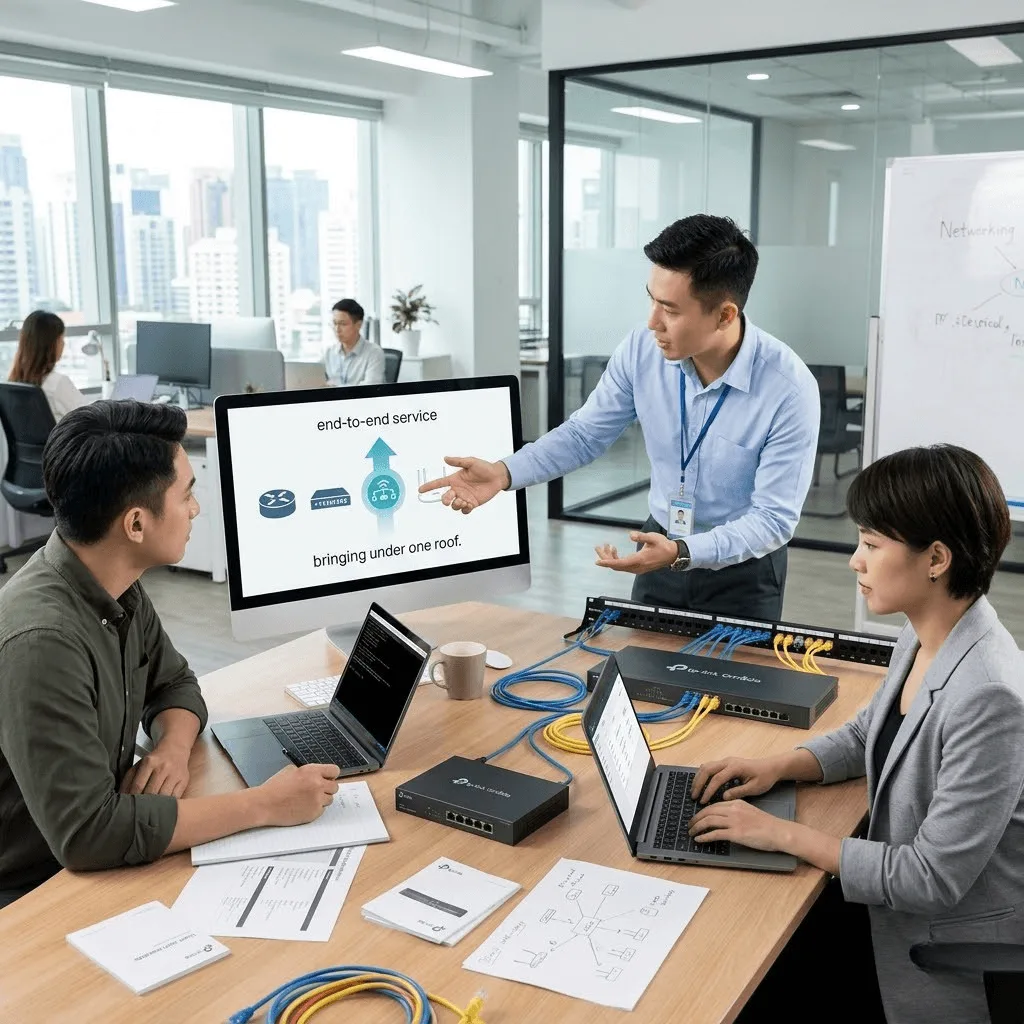
We provide an end-to-end service to bring all your networking gear under one roof.
Advantages
Updating all your access points to the latest, safest software.
Choosing between omada cloud controller setup or local hosting based on your speed needs.
Designing a "Master Map" of your office so you can see your Wi-Fi coverage.
Configuring a secure omada controller Windows service for 24/7 uptime.
Delivering a human-led installation that we explain in very easy words.
Omada Hardware Controller Setup (OC200/OC300)
We install and configure dedicated hardware controllers for maximum reliability.
Advantages
Performing the physical omada physical controller setup on your network rack.
Linking the controller to your PoE switch so it doesn't need a separate power brick.
Setting up the USB auto-backup feature to keep your settings safe.
Managing the "Cloud LED" status to ensure your remote access is always active.
Providing a professional "set-it-and-forget-it" solution for your office.
Secure Guest Portal & Voucher Management
We help you provide safe Wi-Fi to visitors without risking your company’s privacy.
Advantages
Creating a professional "Landing Page" with your company logo for guests.
Setting up "Vouchers" so you can give visitors temporary Wi-Fi codes.
Implementing "Wireless Isolation" so guests can't see your office printers or files.
Offering expert support to setup omada controller rules for your lobby or café.
Scheduling Wi-Fi hours so the guest network turns off automatically at night.
Multi-Site & Cloud Management
We act as your global IT partners, managing multiple office locations from a single screen.
Advantages
Implementing omada cloud controller setup for businesses with many branches.
Monitoring the health of all your stores or offices in real-time.
Standardizing your Wi-Fi passwords across all your locations.
Pushing "Batch Updates" to hundreds of devices at once to save time.
Providing a professional, centralized service that grows with your business.
Network Optimization & Troubleshooting
vorza360 doesn’t just “install” gear; we provide a service to keep it running at peak speed.
Advantages
Using the omada controller setup tools to find and block "Wi-Fi interference."
Adjusting signal power so your Wi-Fi doesn't leak out into the parking lot.
Fixing "Pending" devices that refuse to join the network.
Reviewing your network logs to find the cause of any recent disconnects.
Acting as your dedicated support team for any tp-link omada controller setup needs.
Professional TP-Link Omada Controller Setup
We provide an end-to-end service to bring all your networking gear under one roof.
ADVANTAGES
Choosing between omada cloud controller setup or local hosting based on your speed needs.
Updating all your access points to the latest, safest software.
Designing a "Master Map" of your office so you can see your Wi-Fi coverage.
Configuring a secure omada controller Windows service for 24/7 uptime.
Delivering a human-led installation that we explain in very easy words.
Omada Hardware Controller Setup (OC200/OC300)
We install and configure dedicated hardware controllers for maximum reliability.
ADVANTAGES
Performing the physical omada physical controller setup on your network rack.
Linking the controller to your PoE switch so it doesn't need a separate power brick.
Setting up the USB auto-backup feature to keep your settings safe.
Managing the "Cloud LED" status to ensure your remote access is always active.
Providing a professional "set-it-and-forget-it" solution for your office.
Secure Guest Portal & Voucher Management
We help you provide safe Wi-Fi to visitors without risking your company’s privacy.
ADVANTAGES
Creating a professional "Landing Page" with your company logo for guests.
Setting up "Vouchers" so you can give visitors temporary Wi-Fi codes.
Implementing "Wireless Isolation" so guests can't see your office printers or files.
Scheduling Wi-Fi hours so the guest network turns off automatically at night.
Offering expert support to setup omada controller rules for your lobby or café.
Multi-Site & Cloud Management
We act as your global IT partners, managing multiple office locations from a single screen.
ADVANTAGES
Implementing omada cloud controller setup for businesses with many branches.
Standardizing your Wi-Fi passwords across all your locations.
Monitoring the health of all your stores or offices in real-time.
Pushing "Batch Updates" to hundreds of devices at once to save time.
Providing a professional, centralized service that grows with your business.
Network Optimization & Troubleshooting
vorza360 doesn’t just “install” gear; we provide a service to keep it running at peak speed.
ADVANTAGES
Using the omada controller setup tools to find and block "Wi-Fi interference."
Adjusting signal power so your Wi-Fi doesn't leak out into the parking lot.
Fixing "Pending" devices that refuse to join the network.
Reviewing your network logs to find the cause of any recent disconnects.
Acting as your dedicated support team for any tp-link omada controller setup needs.
Here is what our Clients are saying About us
Kristján Sigurðsson (Iceland)
We’d bought Omada hardware months before actually getting it running because the controller setup kept defeating us. vorza360 came in, deployed the software controller on our server, got all devices adopted, and handed over a fully working system with documentation our team could follow. Worth every penny of the engagement.
Amira Bensalem (Tunisia)
vorza360 set up the Omada Controller for our multi-site office network from scratch. They configured the controller, adopted all access points and switches, and organised everything into a logical site structure. The visibility we now have across our entire network from one interface is genuinely impressive.
Tomasz Zawadzki (Poland)
Our first attempt at setting up the Omada Controller ended with half our devices not adopting and no idea why. vorza360 sorted out the network configuration issues that were blocking adoption, got everything online, and explained what had gone wrong so our team could avoid it in future.
Preethi Chandran (India)
vorza360 migrated us from a standalone Omada setup to a properly configured software controller running on a dedicated VM. The migration preserved all our existing configurations and gave us centralised management we hadn’t had before. A clean transition with no disruption to our wireless users.
Lena Hoffmann (Germany)
We needed the Omada Controller set up in a way our small IT team could manage without specialist knowledge. vorza360 configured everything sensibly, set up role-based admin access, and walked our team through the interface. We’ve been managing it independently ever since with no issues.
Kweku Mensah (Ghana)
vorza360 deployed the Omada Hardware Controller for our retail environment where running a software controller wasn’t practical. They configured it correctly for our network topology, adopted all our APs and switches, and set up monitoring alerts. Solid setup delivered efficiently.
More about Omada (TP-Link)
Omada Cloud Access Configuration
Manage your business network from anywhere in the world with vorza360’s omada cloud…
Got questions? We’ve got answers. Find everything you need to know about using our platform, plans, and features
What is the Omada controller and why is it the foundation of a professional TP-Link network?
The Omada controller is the centralized management platform for all TP-Link Omada network devices, access points, switches, and gateways. Without a controller, each Omada device must be configured individually with no visibility across the whole network. With the controller, all devices are visible, configured, monitored, and updated from a single interface. It enables features that are simply not available in standalone mode: centralized SSID management (change a Wi-Fi password once and it updates across all access points simultaneously), network-wide VLAN segmentation, guest portals, bandwidth policies, roaming optimization between access points, real-time analytics, and zero-touch provisioning for new devices. For any business deploying more than one Omada device, the controller is the difference between a collection of independent Wi-Fi devices and a professionally managed, integrated network.
What is the difference between the Omada Software Controller, Hardware Controller, and Cloud-Based Controller?
TP-Link Omada offers three controller deployment options and vorza360 advises on the right choice for each client. The Software Controller is free software installed on a dedicated Windows or Linux server, it provides the most configuration flexibility and is ideal for businesses with an existing server infrastructure that can host it permanently. It must remain running for management (though the network continues to operate if the controller goes offline). The Hardware Controller (OC200 or OC300) is a dedicated plug-in device that runs the controller on its own hardware without requiring a server, ideal for businesses without server infrastructure, offering a reliable standalone appliance. The Cloud-Based Controller (Omada Cloud Controller, OCC) is hosted in TP-Link’s cloud, accessed via browser from anywhere without any on-site server or dedicated hardware, ideal for multi-site businesses and those wanting zero-maintenance controller infrastructure. vorza360 selects and deploys the option that best matches your environment and operational preferences.
How does vorza360 set up and configure the Omada controller for a new business network?
vorza360’s Omada controller setup process covers every step from deployment to full operation. We begin by deploying the appropriate controller type, installing the Software Controller as a Windows service for automatic startup, physically installing and connecting a Hardware Controller to the network rack, or provisioning a Cloud Controller account. We then perform initial controller configuration: creating the admin account with strong credentials and two-factor authentication, configuring the controller’s network settings, and setting up automatic backup to protect the configuration. We adopt all Omada devices into the controller, the process of bringing access points, switches, and gateways under centralized management. We configure the initial site settings, SSID profiles, and network topology. We create a visual floor plan map to document device placement. And we validate that all devices show as connected and healthy before completing the setup.
How does vorza360 configure Omada controller backups to protect the network configuration?
The Omada controller holds the entire network configuration, all SSIDs, VLANs, security policies, access point settings, and user accounts. Losing this configuration would require reconfiguring the entire network from scratch, causing significant downtime. vorza360 configures Omada controller backups through two mechanisms: automatic scheduled backups within the Omada controller that create regular configuration backup files on a defined schedule (daily is recommended), and external backup of the controller backup files to a network-accessible location or cloud storage so that a complete controller server failure does not take the backup with it. For Hardware Controllers, we configure the USB auto-backup feature that writes configuration backups to an attached USB drive. We test restoration from backup during initial setup and document the restoration procedure so that recovery can be performed quickly by anyone with the documentation, even in our absence.
How does vorza360 migrate an existing standalone TP-Link access point deployment to centralized Omada controller management?
Migrating standalone TP-Link Omada access points to controller management is a process that vorza360 manages carefully to avoid disrupting existing network connectivity during the transition. Omada access points that are currently operating in standalone mode (configured individually via their own web interfaces) must be adopted into the controller, which resets their configuration to the controller’s centralized settings. vorza360’s migration process: we first document all existing standalone configurations, SSID names, passwords, VLAN settings, channel assignments, so we can replicate them in the controller. We deploy and configure the controller with the correct SSID profiles, VLAN settings, and policies matching the existing setup. We then adopt the access points into the controller in batches during a maintenance window, allowing devices to reset and reconnect under controller management. We validate that all connected devices reconnect automatically after adoption and confirm that the new controller-managed configuration matches the pre-migration settings. IT SUPPORT › TP-LINK OMADA › SUBPAGE 02